Example 03: Sequential Optimization.#
In this example, skZemax API is used to:
Load the file made in
Example 01: Set-up and Quick-Focus (Sequential)A copy of this file will be saved as a new skZemax example file.
Set specific properties of the system to be variable.
Setup merit functions to determine how the system will be optimized.
Run a local optimization, followed by a Hammer optimization.
A local optimization is a “quick” optimization based on the merit functions.
A Hammer optimization helps the design to escape local minima in the merit function.
Study the changes in optical prescription
Load the System and Save a copy#
from __future__ import annotations

import os

from skZemax.skZemaxClass import skZemaxClass

skZemax = skZemaxClass()
# Open file
skZemax.Utilities_OpenZemaxFile(
    skZemax.Utilities_skZemaxExampleDir() + os.sep + r"e01_new_file_and_quickfocus.zmx",
    False,
)
# Make a copy of it with different name
skZemax.Utilities_SaveZemaxFileAs(
    skZemax.Utilities_skZemaxExampleDir() + os.sep + r"e03_open_file_and_optimize.zmx"
)
OpenZemaxFile ::  Opening Zemax file [E:\_OfficerRepositories\ZemaxRepos\skZemax\docs\source\Examples\e01_new_file_and_quickfocus.zmx].
SaveZemaxFileAs :: Saving Current Zemax File As [E:\_OfficerRepositories\ZemaxRepos\skZemax\docs\source\Examples\e03_open_file_and_optimize.zmx].
Get the initial state#
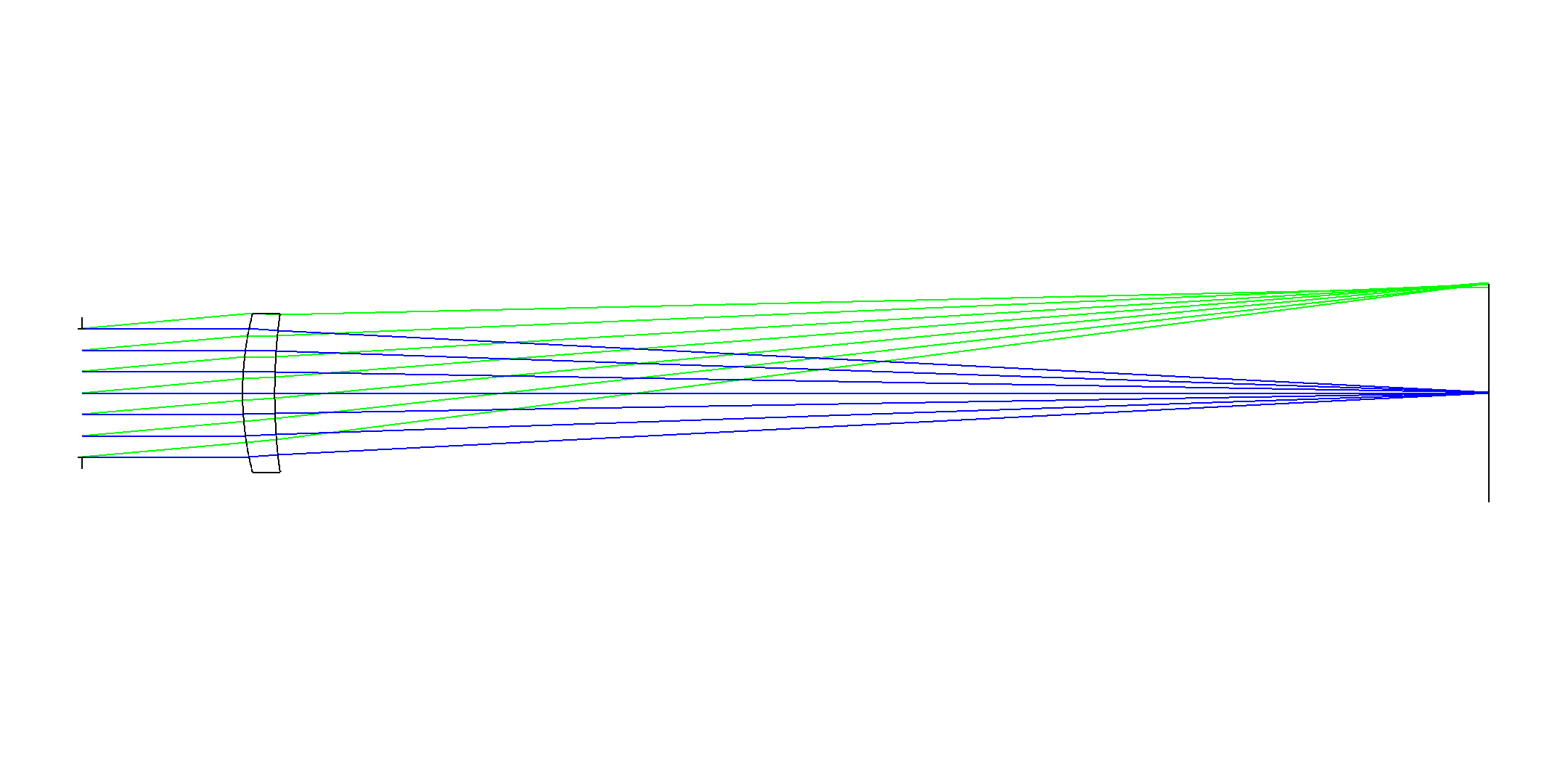
For comparison purposes only, getting the initial prescription and 2D cross section.
skZemax.Visualization_SEQ_2DCrossSection(
    save_image=True,
    saved_image_location=skZemax.Utilities_skZemaxExampleDir()
    + os.sep
    + r"e03_open_file_and_optimize_initial_2DCrossSection.png",
)
init_prescription = skZemax.Analyses_ReportSystemPrescription(
    save_textfile_path=skZemax.Utilities_skZemaxExampleDir()
    + os.sep
    + r"e03_open_file_and_optimize_initial_Prescription.txt"
)
Analyses_RunAnalysesAndGetResults :: Running analysis [PrescriptionDataSettings] ...
Analyses_RunAnalysesAndGetResults :: Done.
Select what variables will be adjusted in the optimization.#
In this example we will adjust:
The
thicknessof surfaces1, 2, and 3.The
radiusof surface2.
skZemax.Solver_LDEMakeSurfacePropertyVariable(1, "thickness")
skZemax.Solver_LDEMakeSurfacePropertyVariable(2, "thickness")
skZemax.Solver_LDEMakeSurfacePropertyVariable(2, "radius")
skZemax.Solver_LDEMakeSurfacePropertyVariable(3, "thickness")
Setting up the merit functions#
There are many operands for merit functions. Section 5.2.1.1. Optimization Operands Summary of the Zemax help pdf file.
Yhis can be accessed from [INSTALL PATH]\Ansys\OpticStudio_UserManual_en.pdf, or by opening Zemax itself and navigating Help -> Help PDF.
Immediately below we optimize to eliminate (target=0) the aberrations of:
ASTI: The third order astigmatism calculated from the Seidel coefficients.Reducing Astigmatism is prioritized over coma by the
weightproperty.
COMA: The third order coma calculated from the Seidel coefficients
skZemax.MFE_SetOperand(
    in_Operand=skZemax.MFE_GetOperand(1), operand_type="ASTI", target=0.0, weight=10.0
)
skZemax.MFE_SetOperand(
    in_Operand=skZemax.MFE_InsertNewOperand(2),
    operand_type="COMA",
    target=0.0,
    weight=1.0,
)
Next we target air gap properties:
MNCA: Minimum center thickness of air between surfaces1 and 3to be0.5.MXCA: Maximum center thickness of air between surfaces1 and 3to be1000.MNEA: Minimum edge thickness in air of all surfaces between1 and 3to be0.5
skZemax.MFE_SetOperand(
    in_Operand=skZemax.MFE_AddNewOperand(),
    operand_type="MNCA",
    target=0.5,
    weight=1.0,
    param1=1,
    param2=3,
)
skZemax.MFE_SetOperand(
    in_Operand=skZemax.MFE_AddNewOperand(),
    operand_type="MXCA",
    target=1000,
    weight=1.0,
    param1=1,
    param2=3,
)
skZemax.MFE_SetOperand(
    in_Operand=skZemax.MFE_AddNewOperand(),
    operand_type="MNEA",
    target=0.5,
    weight=1.0,
    param1=1,
    param2=3,
)
Next we target material gap properties:
MNCG: Minimum center thickness glass between surfaces1 and 3to be3.0.MXCG: Maximum center thickness of glass between surfaces1 and 3to be15.0.MNEG: Minimum edge thickness in glass of all surfaces between1 and 3to be3.0
skZemax.MFE_SetOperand(
    in_Operand=skZemax.MFE_AddNewOperand(),
    operand_type="MNCG",
    target=3.0,
    weight=1.0,
    param1=1,
    param2=3,
)
skZemax.MFE_SetOperand(
    in_Operand=skZemax.MFE_AddNewOperand(),
    operand_type="MXCG",
    target=15.0,
    weight=1.0,
    param1=1,
    param2=3,
)
skZemax.MFE_SetOperand(
    in_Operand=skZemax.MFE_AddNewOperand(),
    operand_type="MNEG",
    target=3.0,
    weight=1.0,
    param1=1,
    param2=3,
)
Running the solves#
First we run a local optimization. Then we follow it with a hammer solve limited to 10 seconds of run time.
# Local optimization till completion
skZemax.Solver_LocalOptimization()
# Hammer for 10 seconds
skZemax.Solver_HammerOptimization(secondsRunning=10.0)
Solver_LocalOptimization :: Running Local Optimization ...
Solver_LocalOptimization :: Done Local Optimization
Solver_HammerOptimization :: Running Hammer Optimization for [10.00] seconds ...
|████████████████████████████████████████| 100% in 10.3s (0.10%/s)
Solver_HammerOptimization :: Done Hammer Optimization.
Save the optimized design.#
skZemax.Utilities_SaveZemaxFile()
SaveZemaxFile :: Saving Current Zemax File.
Comparing the system pre and post optimization#
Displaying a 2D cross section of the initial system which was saved above before any optimization was done.
from IPython.display import Image

Image(
    skZemax.Utilities_skZemaxExampleDir()
    + os.sep
    + r"e03_open_file_and_optimize_initial_2DCrossSection.png",
    width=800,
)
Now making and displaying a 2D cross section of the optimized system
# Make and display the 2D view
skZemax.Visualization_SEQ_2DCrossSection(
    save_image=True,
    saved_image_location=skZemax.Utilities_skZemaxExampleDir()
    + os.sep
    + r"e03_open_file_and_optimize_2DCrossSection.png",
)
Image(
    filename=skZemax.Utilities_skZemaxExampleDir()
    + os.sep
    + r"e03_open_file_and_optimize_2DCrossSection.png",
    width=800,
)
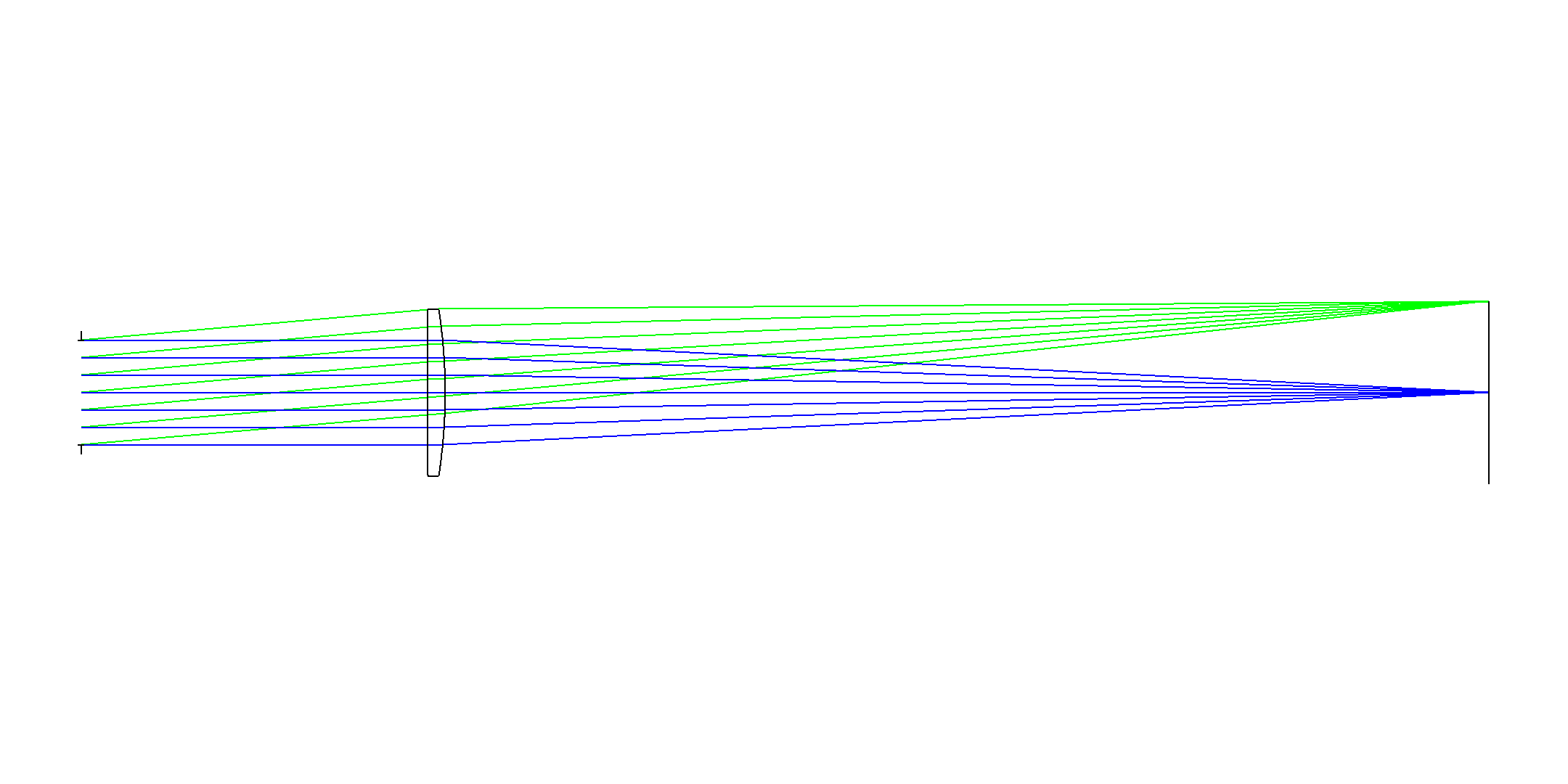
The prescription information shows the specifics of what was done to the system’s surfaces.
# Get the optimized prescription
optimized_prescription = skZemax.Analyses_ReportSystemPrescription(
    save_textfile_path=skZemax.Utilities_skZemaxExampleDir()
    + os.sep
    + r"e03_open_file_and_optimize_optimized_Prescription.txt"
)
# printing
print("INITIAL SURFACES:")
for line in skZemax.Analyses_ExtractSectionOfTextFile(
    in_file=skZemax.Utilities_skZemaxExampleDir()
    + os.sep
    + r"e03_open_file_and_optimize_initial_Prescription.txt",
    start_marker="SURFACE DATA SUMMARY:",
    end_marker="SURFACE DATA DETAIL:",
):
    print(line)
print("OPTIMIZED SURFACES:")
for line in skZemax.Analyses_ExtractSectionOfTextFile(
    in_file=optimized_prescription,
    start_marker="SURFACE DATA SUMMARY:",
    end_marker="SURFACE DATA DETAIL:",
):
    print(line)
Analyses_RunAnalysesAndGetResults :: Running analysis [PrescriptionDataSettings] ...
Analyses_RunAnalysesAndGetResults :: Done.
INITIAL SURFACES:
Surf       	Type        	Radius        	Thickness           	Glass      	  Clear Diam   	  Chip Zone  	  Mech Diam       	   Conic        	Comment
 OBJ	 STANDARD	       Infinity	       Infinity	                     	             0	             0	             0	              0
 STO	 STANDARD	       Infinity	             50	                     	            40	             0	            40	              0	 This is free to move.
   2	 STANDARD	            100	             10	                N-BK7	      49.28854	             0	      49.28854	              0	 Front of lens
   3	 STANDARD	       187.1033	       377.6094	                     	       48.7826	             0	      49.28854	              0	 Back of lens
 IMA	 STANDARD	       Infinity	               	                     	      67.94137	             0	      67.94137	              0

OPTIMIZED SURFACES:
Surf       	Type        	Radius        	Thickness           	Glass      	  Clear Diam   	  Chip Zone  	  Mech Diam       	   Conic        	Comment
 OBJ	 STANDARD	       Infinity	       Infinity	                     	             0	             0	             0	              0
 STO	 STANDARD	       Infinity	       131.8243	                     	            40	             0	            40	              0	 This is free to move.
   2	 STANDARD	   1.599356e+17	       6.768928	                N-BK7	      63.06626	             0	      63.56254	              0	 Front of lens
   3	 STANDARD	        -206.72	       397.2361	                     	      63.56254	             0	      63.56254	              0	 Back of lens
 IMA	 STANDARD	       Infinity	               	                     	      69.77795	             0	      69.77795	              0
Close/Cleanup#
del skZemax
skZemax = None